CPAGrades for accounting firms
Every client, every partner, every hour. One clear view of where your firm stands.
CPAGrades gives accounting firms one place to see client profitability, people and capacity, billing and cash, with Tod to explain what’s behind the numbers.
SOC 2 · HIPAA · GDPR · Fully Managed
Your whole firm, then any slice of it
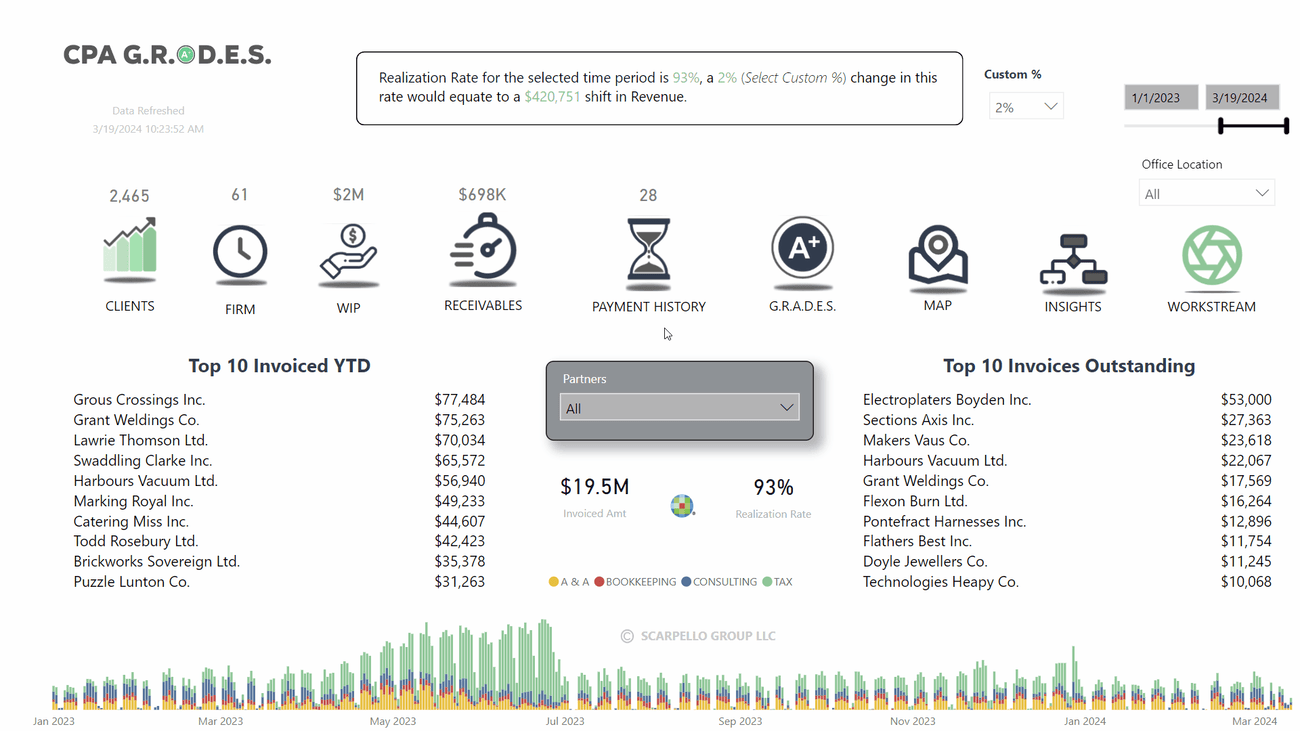
Net fees, billable hours, realization and utilization against last year. Every number has a page behind it.
Trusted by accounting firms



















01 · Clients & grades
Which clients are worth growing?
See gross profit by service line and client industry, then grade any client group against groups its size on profit, realization, tenure, days to pay and more.
Gross profit by category, subcategory and service, and by client industry, each against last year.
Each client group gets a letter grade on every KPI and an overall grade, against the same size band, the same partner or the same office.
See every client group in the band on each measure, so you know where one client sits, not just whether it beats the average.
02 · People & capacity
Who is carrying the work?
See invoiced fees, hours and gross profit by department, skill level and employee, with utilization, realization and write-downs for each person.
Invoiced, hours, gross profit or employees with WIP. Every chart follows, month by month against last year.
Partners, directors, managers, seniors and staff side by side, so you see where the hours and the margin sit.
Employee WIP detail shows each person’s hours, utilization, write-ups and write-downs, realization and profit per hour.
03 · Billing & cash
Are we billing it, and are we getting paid?
Compare production, invoiced and collected against last year by partner, then follow open A/R down to the invoice and the work behind it.
Production, invoiced, collected and realization against matched dates last year, with the partners behind the biggest changes.
Open receivables by age and by partner, client or line of business, with days in A/R against last year.
Open any invoice to see the WIP entries behind it: who did the work, on which service, and for how many hours
04 · Tod AI
What should I do about it?
Ask Tod in plain English. It answers from your firm’s data, builds the chart, and suggests what to look at next.
 Tod AI
/ Ask about your firm
Ask for a scatter plot or a year-over-year comparison and Tod builds it, with the table behind it one click away.
Ask for this week’s scorecard and Tod lays out each measure against its owner and target, from what your firm saved in organization memory.
Open Tod from any page to ask what drove growth or whether a service line is ready for fixed-fee pricing, client by client.
Trust
Can I trust the numbers?
CPAGrades is plain about where each number comes from and what it’s compared against
From your systems
Time, billing, WIP and receivables come from the systems your firm already uses, refreshed automatically.
Always compared
Measures sit against last year on matched dates, or against a peer band of similar client groups, so no number is read on its own.
Tod shows its work
Each Tod answer opens to the analysis behind it, and every chart has its table, so you can check the numbers. Todata does not train AI models with your data.
Secure and fully managed
Todata is SOC 2, HIPAA and GDPR compliant, and fully managed, so your team isn’t running a data system.
How it works
What will this take from my team?
Spend time with clients, not on reports. Todata is fully managed, and it works with the systems your firm already uses.

1. Connect & Clean
Todata connects to your existing systems and models your data automatically. No migration, no manual exports.

2. Conform
Every client, service and employee on one set of definitions, so realization and utilization mean the same thing across partners and offices.

3. Curate
Clients, people, WIP, receivables and grades, built on a data model designed for accounting firms.

4. Act
Get answers in plain English, make the decision, move on.
Keep your current systems. We’ll show you the workflows that get the most out of them.
Real results. Real teams.
“Implementing CPAGrades has been incredibly smooth and hassle-free. This solution has truly simplified our data analysis and decision-making process.”
Becky Shull, CPA
Firm Administrator, The CJ Group
“Plenty of our vendors say they have AI in the software — but this is one of the first platforms we’ve seen where you have truly taken AI and specifically incorporated it into the software. It will actually enhance how we work”
Julie Walker, MBA
COO, Olsen Thielen & Company
“The capabilities of Tod continues to blow me away. I introduced a subjective rating to our current A+ clients, and it was able to take that data and regrade the clients for me. Not only did it do that, but it also offered some pretty nice options for next steps. Consider me a big fan of this product!”
Corey Staples
Director of Operations & Team Development, SP Group PC
Let's Talk About Your Firm
See what CPAGrades shows about your firm
A short demo with your firm in mind. We’ll walk through clients, people, billing and cash, and show how Tod explains what’s behind each number.
SOC 2 · HIPAA · GDPR
Fully Managed → MINIMAL LIFT ON YOUR TEAM → No Manual data entry

Todata Analytics helps teams act intelligently. We turn complex data into clear decisions with our analytics platform, connecting your existing systems with no disruption to your workflow. Based in Omaha, NE.
email. sales@todata.com
3555 Farnam Street, Suite 303, Omaha, NE 68131